Showing posts with label MYSLATE. Show all posts

Thursday, February 28, 2013

Posted by Desitube | File under : , , , , , , , , , , , , ,

Artist's illustration of matter falling into a black hole
Artist's illustration of matter falling into a black hole, with X-rays blasting out from the very center. Click to chandrasekharenate.
Image credit: NASA/JPL-Caltech
Black holes are the Universe’s ultimate garbage disposals: Stuff falls in, and never gets back out. It can’t. To get out, you’d have to travel faster than the speed of light, which (as far as we know) is impossible.
Black holes grow by consuming matter, and in the centers of galaxies they can grow to huge size. In the gorgeous barred spiral galaxy NGC 1365 (shown below), there’s one lurking in the core that has about two million times as much mass as our Sun. Not only that, it is actively gobbling down matter, and that allows us to measure some interesting properties of this cosmic monster, including its spin. Astronomers observed NGC 1365’s black hole using the NuSTAR and XMM-Newton observatories, and were surprised to find out it’s spinning so fast that the outer edge is moving at very nearly the speed of light!
This takes some explaining. Hang on tightly, and for your own safety please keep your arms inside the blog post at all times.
Black holes are confusing, but the bottom line is that they are such highly-concentrated massive objects that their escape velocity is faster than light—I wrote a somewhat more lengthier explanation on the old blog here and here if you want more details. Once something falls in, it cannot get out, but some of the properties of that material remain: specifically mass, spin, and charge. That last bit is literally electrical charge, like how an electron has a negative charge. Physically it’s very interesting, but in practical terms it hardly comes up, so we can ignore it here.
Mass is the critical one, because the more mass a black hole has, the bigger it gets and the stronger its gravity is as well. But spin is important too. Look at, for example, a black hole forming via the collapse of a star’s core when the outer layers explode in a supernova. The core is spinning since the star rotates. As the core collapses, that spin rate increases, in much the same way a skater can increase his or her spin by bringing their arms in close to their body. This is called conservation of angular momentum; objects spinning tend to stay spinning due to momentum, just like any object in motion tends to stay in motion due to momentum. The total angular momentum depends on the object’s size and rate of spin. Increase one and the other must decrease; if you make something smaller it’ll spin faster.
So by the time the core of our doomed star collapses all the way down to a back hole, the spin can be ferociously large.
But there’s more. If there is material around the black hole falling in it can change the spin as well. If material fell straight into the black hole, the spin wouldn’t change much (if anything it would decrease, because the added mass makes the black hole bigger, so, like the skater throwing out his/her arms, the spin slows). But if that material comes in at a slight angle, it can actually add to the spin of the black hole, increasing its angular momentum. That gives a kick to the spin rate, bumping it up.
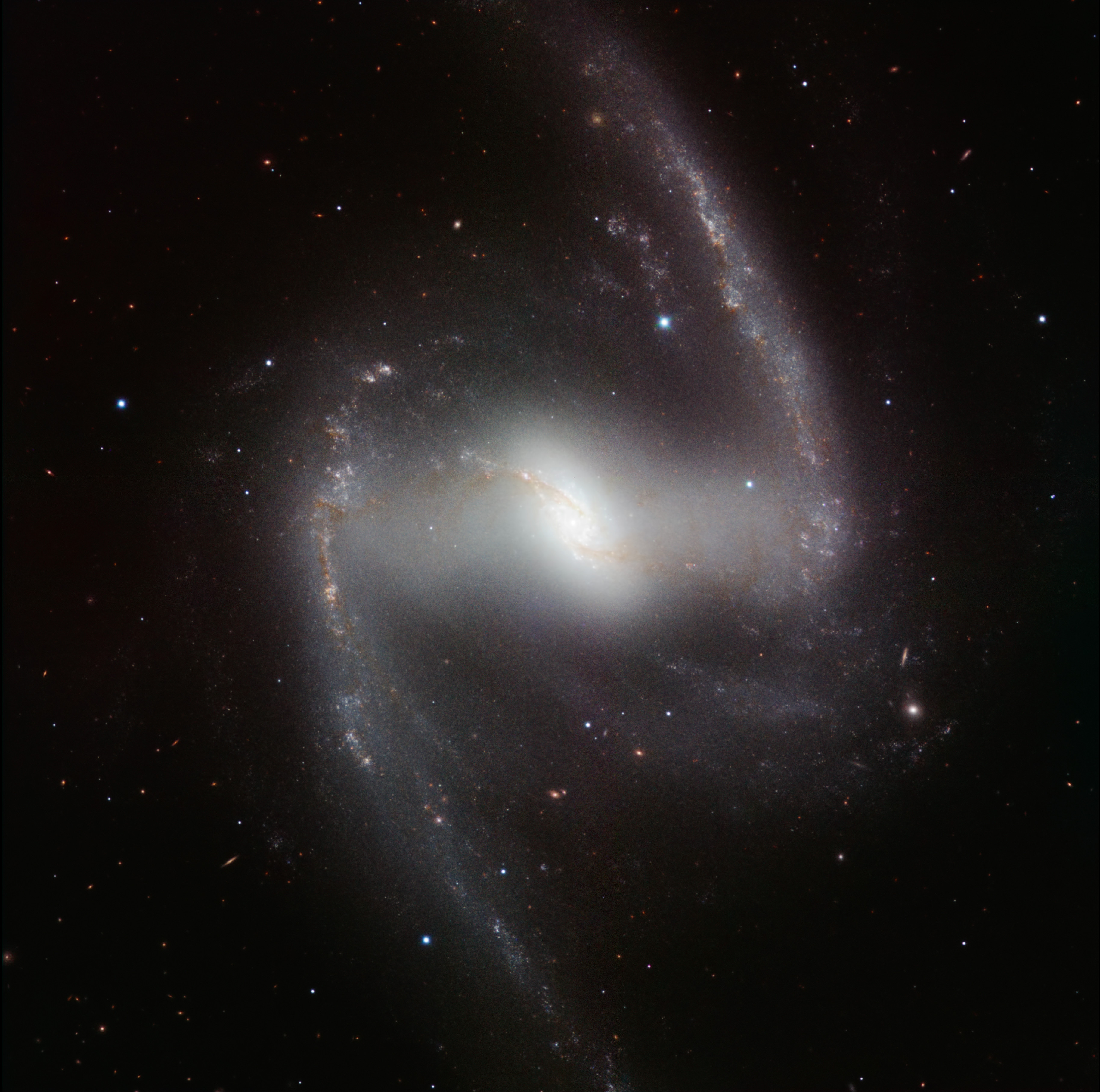
HAWK-I infrared image of the spectacular barred spiral galaxy NGC 1365*
The massive spiral galaxy NGC 1365 has a huge black hole in its heart, spinning at nearly the speed of light. Click to galactinate.
Image credit: ESO/P. Grosbøl
And that brings us back to NGC 1365, located about 60 million light years from Earth. Astronomers used NuSTAR to look at X-rays pouring out of material falling into the black hole there. As that material falls in it heats up to millions of degrees, blasting out X-rays that are easily bright enough to see from Earth with the right equipment. Careful observations allowed astronomers to see these X-rays coming from matter just before it reached The Point Of No Return, at a position called the Innermost Stable Circular Orbit, or ISCO. If it gets any closer, blooop! It falls in, and it’s gone.
As the material swirls around the black hole, it emits X-rays at a very specific energy—think of it as a color. But as it orbits that color gets smeared out due to the Doppler effect. The amount of smearing indicates how fast the material is moving, and that in turn can tell astronomers how fast the black hole is spinning. This can be complicated by the presence of dense clouds of material farther out from the black hole that absorb X-rays and mess up our observations. The new data from NuSTAR allowed astronomers to show that the smearing seen is definitely due to rotation and not obscuration, unambiguously revealing the black hole's tremendous spin: just a hair below the speed of light!
Most black holes spin far slower than that, so something ramped this hole’s spin way up. One possibility, as I mentioned above, is material falling in over time. Another is that it ate one or more other black holes, which is creepy but possible. Galaxies collide, and when they do their central black holes can merge, growing larger. If the geometry is just right, this can create a single black hole with more spin. Due this a few times, and you can spin one up to fantastic speeds.
I’ll note that NGC 1365 is a massive galaxy, easily twice as large as the Milky Way (an we’re one of the biggest galaxies in the Universe). That’s exactly what you’d expect from a galaxy that’s spent a lifetime eating other ones. Cosmic cannibals grow fat when the hunting’s good.
This is a pretty amazing finding by the NuSTAR astronomers. It shows that extremely detailed X-rays observations are possible; something that’s very difficult and painstaking to do. It also demonstrates that we can take a pretty close look at black holes and tease out details that were previously not possible to see. This in turn means we can test a lot of the hypotheses we have about these monsters and improve our understanding of them.
By themselves, black holes are invisible, dark, and nearly impossible to observe. But they’re sloppy eaters, and this betrays many of their secrets. Even from 600 million trillionkilometers away.

MacBook Air notebook computers sit on display after a news conference in Cupertino, California, October 14, 2008.
No touching.
Photo by Kimberly White/Reuters
Like many kids, my 2-year-old son can run circles around you on an iPad. He learned to unlock the screen before he learned to conjugate verbs, and nowadays he can turn it on, find Netflix or a game, and keep himself occupied forever, or at least for a merciful 40 minutes. (Email me here to tell me what a terrible parent I am.)
Computers, though, flummox him. He’s especially confused by pointing devices—I’ve tried to teach him about the relationship between his fingers on the track pad and the pointer on the screen, but he’s too innocent of the ways of the world to understand such mysticism. So when I plop him down in front of YouTube on my MacBook while my wife and I try to enjoy a lovely dinner—see that email address above—he always gets confused when a video ends. He reaches for the screen and repeatedly taps to get a new clip to play. It’s pretty funny, actually. And then he whines for me to help him, which is kind of annoying.
But of course, my kid is totally right. Why doesn’t the MacBook screen respond to his touch? In the couple of years since my son was born, nearly every screen that we interact with has become touch-enabled. Your phone, tablet, Kindle, GPS, car radio, and maybeeven your fridge—you can tap that. But not your computer. Or, more specifically, not yourMac.
Last fall Microsoft released Windows 8, which brings touch capabilities to the ubiquitous PC operating system. This year PC makers are putting out dozens of touch-enabled Windows 8 laptops and desktops. Or consider Google’s new Chromebook Pixel, which has a brilliant high-definition display screen that responds to touch. At $1,299, the Pixel is a high-end machine, but what’s most interesting about touch screens is that they’re quickly becoming a standard feature even on low- and mid-range machines. The Asus VivoBook, an 11-inch touch-screen laptop, sells for under $500. The HP Pavilion TouchSmart goes for $649.* When you get to machines classified as “ultrabooks”—the thin and light PCs that are meant to compete with Apple’s MacBook Air—it’s hard to find any that don’t have touch screens. The Acer Aspire S7, the Asus Zenbook Prime Touch, and the Samsung Series 7 Chronos—which go for around $1,100—can all be touched. You’ll spend around the same for a Mac, but if you touch its screen, all you’ll get are smudges.
I should note that the new touch PCs don’t dispense with track pads or mice; you’ll spend most of your time controlling them through those traditional means. But they also allow you to touch—if my son tapped a YouTube clip on the Pixel’s screen, the video would start playing, and I’d be able to continue eating dinner in peace.
The rise of touch-enabled computers raises two questions. First, what’s the point: Do you really need to be able to touch your computer’s screen rather than use a track pad or mouse? And second, why is Apple—the firm that has done more to stoke our collective touch-screen fervor than any other—apparently holding out against touch on its computers?
To answer the first question: Yes, a touch screen on a PC can be useful. Over the past few months I’ve used a few touch-enabled Windows 8 PCs, and during the last week I’ve been playing with a Chromebook Pixel that Google sent me to review. I’ve found their touch screens to be handy—the screen complements the keyboard and the track pad quite naturally, making for one more way to get your computer to do your bidding. I wouldn’t go so far as to say you need a touch screen on your PC. Touching the screen doesn’t allow you to do anything you couldn’t do on a nontouch PC. But like other high-end laptop features—a backlit keyboard, a slot for an SD card, a high-definition display—a touch screen is a nice thing to have.
I found myself touching the screen during a few primary tasks. If I pulled up a long article on the Web and sat back to read, I’d sometimes reach for the screen to scroll down rather than hit the keyboard or flick at the track pad. I did the same when I was flipping through photos. Windows 8 has two completely different interfaces—a traditional “desktop” mode in which you click on small icons to launch programs that run in multiple windows on your screen (i.e., the Windows we all know and love), and a “modern” mode in which apps occupy the full screen and feature large, touch-friendly buttons. When I used this second mode, I found myself touching more often—to browse Amazon or Netflix, to read the news, or to play games.
You may have spotted a pattern there: I tended to touch for leisure activities, and I’d stick to the keyboard and track pad when doing work. But this wasn’t by design, and I only discerned the leisure-vs.-work behavior when I thought about it later. Indeed, while using these touch laptops, the touching became intuitive and invisible. I flitted among the screen, the track pad, and the keyboard from moment to moment without ever having to think about it.
I didn’t expect to take to touching my PC. The conventional criticism against adding touch to laptops is that it’s unnatural. When you use a laptop, your hands usually rest on the keyboard, which is relatively far from the screen; from that position it’s easier to reach for the track pad than the display. The other problem is what’s on the screen. On a PC—even a Windows 8 machine with an interface specifically designed for touch—there are lots of small controls that are better handled with a precise pointer than your fat finger. For instance, to close a tab in the Chrome browser, you’ve got to hit a little X next to the tab’s title. I’d often miss that X when I tried to hit it with my finger. That was a bit frustrating—although after a few times making that mistake, I learned to stop trying to close tabs with my finger, and then I didn’t get annoyed anymore.
This gets to why Apple hasn’t added touch to the Mac. While it’s mostly handy, sometimes touching your PC’s screen results in an annoying experience. And it’s just not Apple’s way to build a new feature that’s sometimes annoying (well, OK, other than in iTunes, Maps, Siri … ). Thus, to do it right, giving a MacBook a touch screen wouldn’t just require a small hardware upgrade to the screen—Apple would also have to reimagine its OS, redesigning it so that every element could be controlled as easily with your fingers as with a pointer. Microsoft solved this problem by building a touch-friendly interface that sits alongside the old Windows’ point-and-click interface, but I don’t think Apple would go for that—it feels too tacked-on and inelegant. Apple would have to do something bigger and more ambitious than that. But why should it? Considering that the Mac is an ever-smaller part of its revenues, and that Apple firmly believes that PCs will be eclipsed by tablets anyway, it has little incentive to make the Mac touch-friendly. Thus, for the foreseeable future, we’re likely to be stuck with touch-less Macs. (Indeed, CEO Tim Cook came close to ruling them out in a conference call with investors last year.)
And that’s too bad. Last month I spoke to Tami Reller, Microsoft’s chief marketing officer for the Windows division, and Aidan Marcuss, a principal director for Windows Research, at the company’s San Francisco office. On their trip from Redmond, Wash., Reller and Marcuss had brought along several touch-enabled Windows 8 laptops, which they described as being the future of computing.
“For consumers—for mainstream laptops—they’ll be increasingly all be touch,” Reller told me. This wasn’t an idle prediction. Reller’s position was bolstered by data. Throughout the development of Windows 8, Microsoft has been tracking anonymous usage data from people’s computers. It has now collected more than 1.2 billion hours of data—more than 700 centuries—about how people use Windows 8. And the data is definitive: It shows that when people are given PCs with touch screens, they use them.
“We see it very clearly in the data,” Marcuss said. “People with touch laptops touch the screen. They reach out, they touch it, and over time they touch it more. They intersperse typing and touching quite a bit. It makes them more efficient in many of the things they want to do—for instance, in the very simple use case of flipping through a PowerPoint presentation. The data supports it. People do it.”
Soon, you too will be reaching out and touching your laptop—unless it’s a Mac.